Name of Each Component
Head unit
The image of this product may be different from the actual product.
|
|
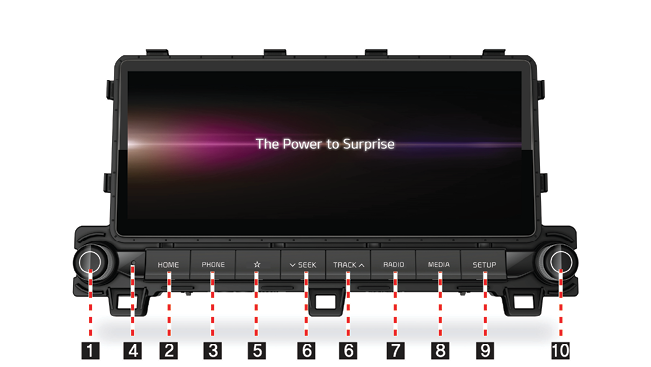
- Power button/Volume knob
- Press to turn the power on.
- When power is on, press and hold to turn power off.
- When power is on, press to turn Audio off.
- Turn left/right to control volume.
- HOME button
Press to go to the home screen.
- PHONE button
Press to go to the phone screen.
- Reset hole ( b )
Press with a thin object to reset the unit when it does not operate normally.
-
Custom button (
 )
)
Press to move to the [Custom button] menu. After setting a desired function, press to use the desired function.
- A SEEK/TRACK D button
When it is pressed for a short time.
- Radio mode: Plays previous/next available frequency or station.
- Media mode: Plays previous/next file.
When it is pressed and held
- Radio mode: Plays previous/next available frequency or station.
- Media mode : Rewinds or fast forwards the file.
- RADIO button
Press to go to the radio screen.
- MEDIA button
Press to go to the available media.
- SETUP button
Press to go to the settings screen.
- Tune/Enter knob
In Radio mode, turn left/right to change the frequency or station.
In Media mode, turn left/right to change file and press to select the desired file.
Steering Wheel Remote Control
The image of this product may be different from the actual product.
|
|
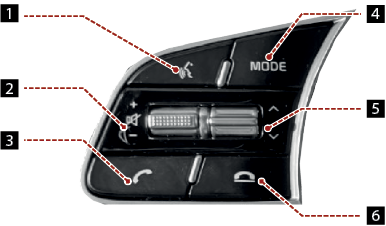
-
Voice Recognition button (
 )
)
Press to switch to voice recognition mode.
- + / - button
Increases or decreases the volume level.
 (Mute)
Press to mute the sound. (It will be paused in some media modes.)
-
 button
Press to operate Bluetooth hands-free function.
- Press to accept a call.
- Press to make a call from last calls.
- Press and hold for redialing.
- MODE button
- Each time this button is pressed, the Radio or Media mode is changed.
- If the media is not connected, it is changed in the order FM > AM > FM.
- When it is pressed and held, move to Advanced settings "Steering wheel MODE button".
- W/S button
When it is pressed for a short time
- Radio mode: Plays previous/next Favourites.
- Media mode: Plays previous/next file.
When it is pressed and held
- AM mode: Plays previous/next available frequency or station
- Media mode: Rewinds or fast forwards the file.
-
 button
- Press to end the phone call during a call.
- Press to reject the call in the incoming call screen.
- Press to end Voice memo recording.