WebLink
About WebLink
The WebLink Host app turns your vehicle into a connected car by letting you easily enjoy your favorite apps on the go. Once you’ve downloaded the app, simply use your smartphone to connect to your car’s WebLink-compatible multimedia receiver, and then launch popular navigation, media, weather, and even calendar apps.
What you need?
- A smart phone with a data plan.
- A vehicle that’s compatible with WebLink.
- A USB cable.
Before starting WebLink
A. Smartphone Compatibility
Recommended smartphone list
- Smartphones which is shared as “compatible device list” are recommended to use weblink.
|
# |
Device |
|
1 |
iPhone 7 |
|
2 |
iPhone 7+ |
|
3 |
iPhone 8 |
|
4 |
iPhone XS Max |
|
5 |
iPhone XR |
|
6 |
Samsung Galaxy S5 |
|
7 |
Samsung Galaxy S7 |
|
8 |
Samsung Galaxy S8 |
|
9 |
Samsung Galaxy S8+ |
|
10 |
Samsung Galaxy S9 |
|
11 |
Samsung Galaxy Note 10 |
|
12 |
Samsung Galaxy Note 8 |
|
13 |
Samsung Galaxy J5 |
|
14 |
Samsung Galaxy S10 |
|
15 |
Samsung Galaxy S10e |
|
16 |
Nexus 5 |
|
17 |
Nexus 5X |
|
18 |
Nexus 6 |
|
19 |
Nexus 6P |
|
20 |
Google Pixel 1 |
|
21 |
Google Pixel 2 |
|
22 |
Google Pixel 2XL |
|
23 |
Huawei P10 Lite |
|
24 |
Huawei Honor 5C |
|
25 |
Xiaomi Redmi Note 5A |
|
26 |
Xiaomi MI A2 (Xiaomi 6) |
|
27 |
LG G7 Fit |
Android phone : User can control app by touching AV screen.
iPhone : Only screen mirroring is supported
B. Cast starting application
“Gallery” app requires to be initial default app when entering Weblink cast function.
※ It is Weblink’s specification.
C. Driving regulation
Do not watch video while driving for your safety. Driving regulation will not support while driving.
D. Radio sound mixing
Car radio is not supported during using Weblink because car speaker supports smartphone sound.
※ Support Bluetooth music.
E. USB cable
Recommend to use certified USB cable.
F. Landscape mode
If smartphone doesn’t support landscape mode, user requires to install “default landscape app”.
※ Landscape mode is essential.
Before Using WebLink
Installing the WebLink Application
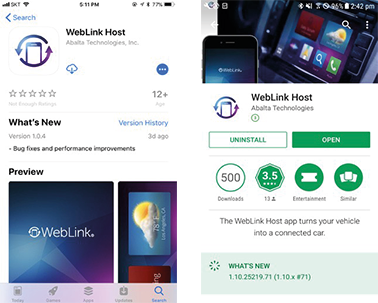
Install the WebLink Host application and the applications supported by WebLink Host application into your mobile phone.
|
|
|
|
|
, NOTE |
|
For details, visit the Abalta website ( http://www.abaltatech.com ). |
Setting the system
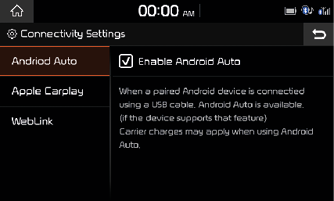
Before connecting your mobile phone, check whether WebLink is set to be used in Setup > [Connectivity].
|
|
Starting Mode
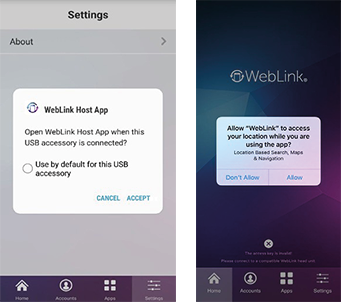
Connect your mobile phone to your vehicle using a USB cable.
In your phone, touch [Accept].
|
|
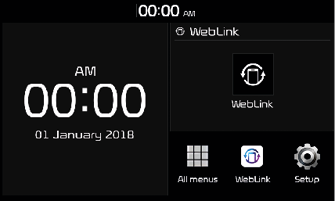
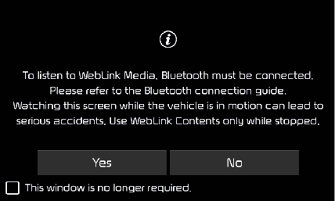
Press [MEDIA] > [WebLink] > [Yes].
|
|
|
|
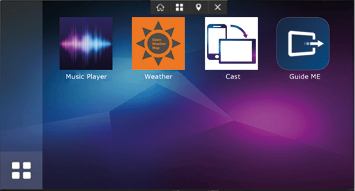
Home Screen
|
|
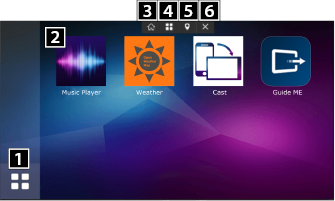
1 Displays the WebLink Home screen
2 Available applications
3 Returns to the system Home screen
4 Displays the WebLink Home screen
5 Displays the Waze Home screen
6 Minimizes the menu bar